Shortcode Parameter Reference
TableCrafter exposes a single shortcode, [tablecrafter], that turns a JSON API, Google Sheet, CSV file, or Airtable base into an accessible, server-rendered WordPress table. This page lists every attribute the handler accepts, with its exact type, default value, and runtime behavior.
The Shortcode Tag
TableCrafter registers exactly one shortcode tag, tablecrafter, handled by the render_table() method. The same attribute set powers the native Gutenberg block (tablecrafter/data-table) and the Elementor widget, so anything documented here applies across all three integration methods.
# Minimal usage, only the source is required
[tablecrafter source="https://example.com/api/products.json"]
The source attribute accepts any public JSON endpoint, a Google Sheets share URL, a URL ending in .csv, a local file inside your WordPress install, or an airtable:// base reference. The source type is auto-detected at fetch time.
Every attribute except source is optional. Unknown attributes are silently discarded by WordPress's shortcode_atts() whitelist, so a typo in an attribute name will simply fall back to its default rather than error.
Parameter Reference
The table below is the complete, authoritative list of attributes accepted by [tablecrafter]. Defaults are the literal values the handler applies when the attribute is omitted.
| Attribute | Required | Type | Default | Description |
|---|---|---|---|---|
| source | Required | string (URL) | "" | The data source: a JSON API URL, Google Sheets URL, .csv URL, a local file under your site root, or an airtable:// reference. Sanitized with esc_url_raw(). If empty, a placeholder is rendered instead of a table. |
| id | Optional | string | tc-{uniqid} | The HTML id of the table container. Auto-generated per render if not supplied. Set it explicitly when you need to target the table from custom CSS or JavaScript. |
| root | Optional | string (dot path) | "" | Dot-notation path to the array within a nested JSON response (e.g. data.results). Each segment is traversed in order; a missing key produces a "Path Error" for admins. |
| include | Optional | string (CSV) | "" | Comma-separated list of column keys to display. Only these columns are shown, and they are rendered in the exact order you list them. |
| exclude | Optional | string (CSV) | "" | Comma-separated list of column keys to hide. Applied after include. Use one or the other rather than both for predictable results. |
| search | Optional | boolean | false | Shows the live, client-side search box above the table for instant filtering across all visible columns. |
| filters | Optional | boolean | true | Enables per-column filter controls. Enabled by default; set to false to render a plain table with no filter UI. |
| export | Optional | boolean | false | Adds export tools (CSV / clipboard, plus XLSX and PDF via the export handler). Exports respect the currently applied search and filters. |
| per_page | Optional | integer | 0 | Rows shown per page for client-side pagination. 0 disables pagination and renders all rows. |
| sort | Optional | string | "" | Initial sort in column:direction format (e.g. price:desc). Direction accepts asc/ascending or desc/descending. Ignored if the column is not in the visible header set. |
| auto_refresh | Optional | boolean | false | Enables automatic background re-fetching of the data source so the table stays current without a page reload. |
| refresh_interval | Optional | integer (ms) | 300000 | How often auto-refresh runs, in milliseconds. The default 300000 equals five minutes. Only relevant when auto_refresh="true". |
| refresh_indicator | Optional | boolean | true | Shows the visual refresh control / spinner during auto-refresh cycles. |
| refresh_countdown | Optional | boolean | false | Displays a live countdown to the next scheduled refresh. |
| refresh_last_updated | Optional | boolean | true | Shows an "Updated X ago" timestamp reflecting when the data was last fetched. |
error_message is not a registered shortcode attribute. End users always see a fixed graceful fallback ("Unable to load data. Please check back later.") when a fetch fails, and administrators see a detailed diagnostic helper instead.
How Boolean Attributes Are Parsed
Shortcode attributes always arrive as strings. TableCrafter normalizes the boolean-style attributes (search, filters, export, auto_refresh, refresh_indicator, refresh_countdown, refresh_last_updated) before use.
A value is treated as true only when it equals (case-insensitively) true, 1, or yes. Every other value, including false, 0, no, or an empty string, resolves to false.
# All three of these enable search
[tablecrafter source="..." search="true"]
[tablecrafter source="..." search="1"]
[tablecrafter source="..." search="yes"]Because filters defaults to true, you only need to write filters="false" when you want to turn the column filter UI off. The same is true for refresh_indicator and refresh_last_updated.
Selecting and Ordering Columns
Use include to whitelist columns and control their left-to-right order, or exclude to hide a few columns while keeping the rest of the source order intact.
# Show only these three columns, in this exact order
[tablecrafter source="https://example.com/users.json"
  include="name,email,role"]

# Show everything except internal fields
[tablecrafter source="https://example.com/users.json"
  exclude="internal_id,password_hash"]
Keys must match the field names in your data source exactly. Filtering happens server-side during render, so excluded columns never reach the page HTML.
Pointing at Nested JSON with root
Many APIs wrap their list of records inside an envelope object. The root attribute walks the JSON one dot-separated segment at a time until it reaches the array you want to display.
# Response: { "data": { "results": [ ...rows... ] } }
[tablecrafter source="https://api.example.com/v1/items"
  root="data.results"]
If any segment is missing, TableCrafter returns a clear "Path Error" naming the offending key (visible to administrators). If the resolved target is not an array, you will see a "Structure Error" instead.
Sorting and Pagination
Set an initial sort and a page size together for large datasets. The sort value is split on the first colon into a field and a direction; the chosen column also receives the correct aria-sort attribute for screen readers.
[tablecrafter source="https://example.com/products.json"
  sort="price:desc"
  per_page="25"
  search="true"
  export="true"]
The sort is only applied when the named column is part of the visible header set (after include/exclude are processed), so a sort on a hidden or misspelled column is safely ignored.
Live Auto-Refresh
For dashboards and live data, combine auto_refresh with the refresh display options. The interval is expressed in milliseconds.
# Refresh every 60 seconds, show a countdown
[tablecrafter source="https://api.example.com/prices.json"
  auto_refresh="true"
  refresh_interval="60000"
  refresh_countdown="true"]
Independently of this client-side refresh, TableCrafter caches the rendered HTML using a Stale-While-Revalidate strategy. The first render is fetched synchronously and cached for an hour; once the cache is older than five minutes, a background WP-Cron event re-fetches the source so the next visitor sees fresh data without waiting.
Using the Shortcode in Theme Templates
To embed a table directly in a PHP template, pass the shortcode string through do_shortcode().
echo do_shortcode('[tablecrafter source="https://example.com/data.json" search="true"]');Generating Shortcodes in the Admin
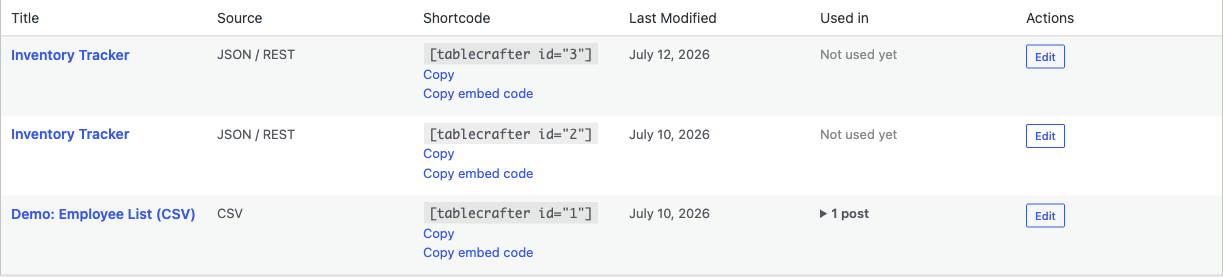
You do not have to write attributes by hand. The plugin ships a visual builder in wp-admin:
- In the WordPress sidebar, open TableCrafter (top-level menu, slug
tablecrafter-wp-data-tables). - Enter your source URL and toggle the options you need (Search, Filters, Export, and so on).
- Click Preview Table to verify the data and column mapping with a live preview.
- Copy the generated
[tablecrafter]shortcode and paste it into any post, page, or widget.
Access to the TableCrafter admin pages and the secure REST/AJAX data proxy requires the manage_options capability, so only administrators can build and preview tables.
Next, see data-sources.html for the full list of supported source types and their URL formats, and export-handler.html for details on the CSV, XLSX, and PDF export pipeline.