Pagination
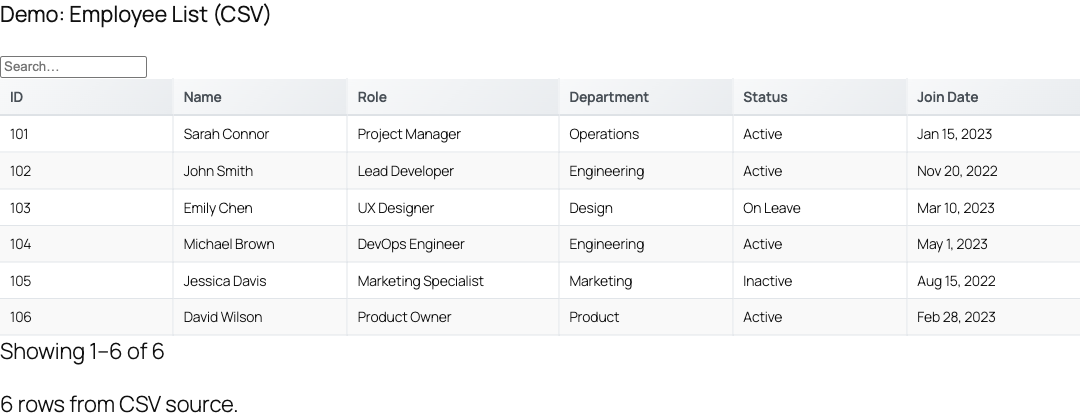
TableCrafter paginates tables entirely in the browser, splitting your data into navigable pages so large datasets stay fast and readable. A single per_page attribute turns it on and sets the page size.
Overview
Pagination is client-side. TableCrafter renders the full dataset into the page (server-side for SEO, then hydrated by JavaScript) and the core library slices it into pages on the fly. Because all rows are already present, paging, sorting, searching, and filtering happen instantly without extra network requests.
Pagination is controlled by one shortcode/block attribute, per_page. When it is set to a value greater than 0, the table shows that many rows per page and renders navigation controls beneath the table. When it is 0 (the default), pagination is off and every row is shown at once.
Pagination controls only appear when the filtered data actually has more rows than the page size. A 5-row table with per_page="10" will simply render all 5 rows with no pager.
Enabling pagination
Add the per_page attribute to the [tablecrafter] shortcode with the number of rows you want per page:
# Show 10 rows per page
[tablecrafter source="https://api.example.com/products.json" per_page="10"]
Combine it with live search for a typical large-dataset setup:
[tablecrafter source="..." search="true" per_page="10"]To explicitly disable pagination (show all rows), omit per_page or set it to 0:
# Both render every row, no pager
[tablecrafter source="..."]
[tablecrafter source="..." per_page="0"]
The per_page attribute
| Attribute | Type | Default | Description |
|---|---|---|---|
| per_page Optional | number | 0 | Rows displayed per page. 0 disables pagination and shows all rows. Any value greater than zero enables client-side pagination with that page size. |
The value flows from the shortcode into a data-per-page attribute on the table container. The frontend initializer reads it and configures the core library:
// assets/js/frontend.js, how per_page maps to the library
const perPage = container.getAttribute('data-per-page')
  ? parseInt(container.getAttribute('data-per-page')) : 0;

new TableCrafter('#' + id, {
  pagination: perPage > 0,
  pageSize:   perPage > 0 ? perPage : 25,
  // ...
});If pagination is internally enabled but no explicit per_page is provided, the core library falls back to a default page size of 25 rows.
Enabling pagination in the block and builder
You do not have to hand-write the attribute. Both no-code paths expose the same setting:
- Gutenberg block: add the TableCrafter block, then set the Rows Per Page field in the block sidebar. The inline help notes "0 = show all rows, 10-50 recommended for large datasets."
- Visual Shortcode Builder: open the TableCrafter admin menu, enter your source, fill in the Rows Per Page input, preview the live table, and copy the generated shortcode (the builder appends
per_page="…"for you). - Elementor widget: the per-page control feeds the live preview, which renders a capped sample of rows while you design.
Pagination controls
When the pager renders, TableCrafter builds a .tc-pagination region below the table containing a status line and navigation controls. The controls scale with the number of pages:
| Control | Appears when | Behavior |
|---|---|---|
| Page info | Always | Shows "start-end of total" (e.g. 1-10 of 1,240), localized with thousands separators. |
| Previous / Next | Always | Step one page back or forward; disabled at the first/last page. |
| Current / total page | 5 pages or fewer | Simple "n of N" page indicator. |
| Page-jump input | More than 5 pages | A number input to type a target page and jump directly to it. |
| First / Last (≪ ≫) | More than 10 pages | Jump straight to the first or last page. |
| Rows-per-page selector | Dataset exceeds the large-dataset threshold | Dropdown of 10 / 25 / 50 / 100 / 250 that changes page size live and resets to page 1. |
Navigation is bounds-checked: goToPage() ignores requests outside the valid 1…totalPages range, so a bad page-jump value snaps back to the current page.
Pagination with search, filters, and sorting
Paging operates on the filtered result set, not the raw data. The total page count is computed as ceil(filteredRows / pageSize), so applying a search term or column filter recalculates the pages immediately. This keeps the pager honest: searching a 10,000-row table down to 30 matches produces 3 pages of 10, not 1,000.
Sorting reorders the full dataset before slicing, so sort order is consistent across page boundaries rather than only sorting the visible page.
Pair per_page with search="true" and filters="true" for large tables. Visitors narrow the data first, then page through a much smaller, relevant result set.
Large datasets and auto-optimization
TableCrafter watches dataset size and tunes itself so big tables stay responsive. These optimizations layer on top of whatever per_page you set:
| Dataset size | What happens |
|---|---|
| Over 1,000 rows | Pagination is auto-enabled (large-dataset threshold). The rows-per-page selector appears and the page info gains an "(Optimized)" indicator. |
| Over 2,000 rows | Page size is adjusted to 25 for balanced performance. |
| Over 5,000 rows | Page size moves to 50 and virtual scrolling can engage, rendering only the rows in view. |
| Over 10,000 rows | A console warning suggests considering server-side pagination for optimal performance. |
Because rendering is server-side first and the data is embedded for instant hydration, even large tables remain crawlable and avoid a second fetch on load.
Pagination here is purely client-side: the browser receives every row before paging them. For datasets in the tens of thousands, this means a larger initial payload. Use include/exclude to trim columns, and lean on search/filters to keep the working set manageable.
State preservation
The current page is part of TableCrafter's persisted UI state. When state persistence is active, the library stores the active page (alongside filters, sort field, sort order, and selected rows) in sessionStorage or localStorage and restores it on reload via loadState(). During auto-refresh, the table also preserves the visitor's current page so live updates don't yank them back to page 1.
Examples
Searchable directory, 25 rows per page:
[tablecrafter source="https://example.com/staff.csv"
  search="true" per_page="25"]
Curated, paginated view of a heavy API (fewer columns, small pages):
[tablecrafter source="https://api.example.com/coins.json"
  include="name,price,symbol" per_page="15" filters="true"]
Use in a PHP template:
echo do_shortcode('[tablecrafter source="..." per_page="20"]');Next steps
Pagination works best alongside filtering and live search, see filtering.html and live-search.html to help visitors zero in on the rows that matter before they start paging.